Several coding agents, several projects, one window.
Lineside is a cockpit for the agents you run side by side. Each task gets its own lane — a git worktree, a terminal, an agent — and the rail tells you at a glance who is working, who is done, and who is waiting on you.
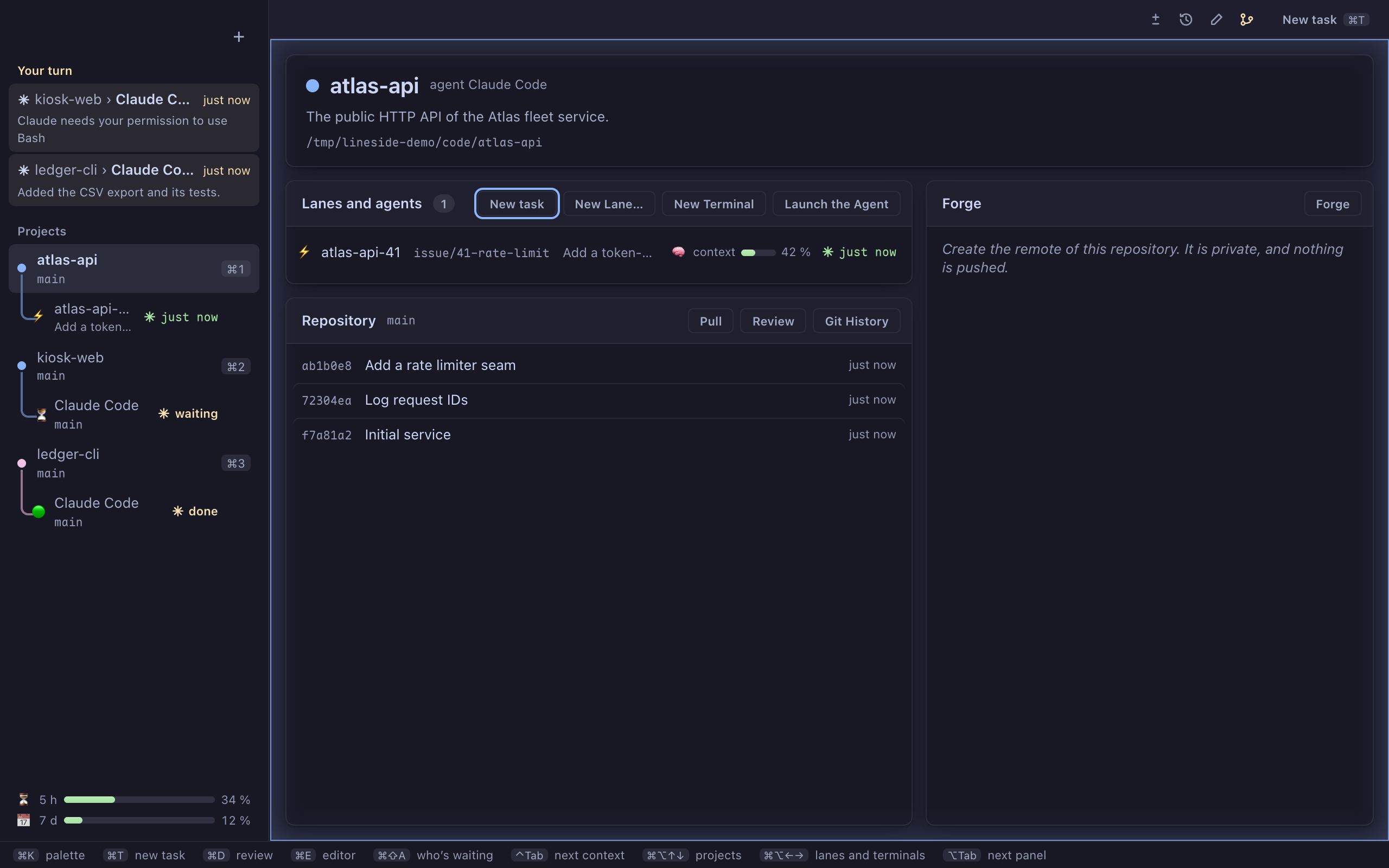
Who’s waiting on you
Every agent sits on the rail, under its project, and its node says what it is doing. Two states move — working, and waiting on you — so the rail reads at a glance.
- ⚡️ Working — the agent has the floor.
- ⌛️ Waiting on you — a question, or a permission to grant.
- 🛑 API error — a quota or an outage stopped its turn.
- 🟢 Turn finished — its answer is ready to read.
Your turn lists the agents waiting on you, oldest first, and ⌘⇧A / Ctrl+Shift+A takes you to the next one. A permission can be granted straight from the rail.
The banner shows how full the agent’s context is, and the foot of the rail your five-hour and seven-day quotas, read from your Claude Code status line. A notification warns you past 90 %.
One task, one lane
A lane is a git worktree filed under its project, with its own terminal and its own agent. Several agents work on the same project without stepping on each other.
Hand over a task
⌘T / Ctrl+Shift+T takes a brief — several lines, pasted screenshots — creates the lane, opens its terminal and starts the agent on it.
Nothing gets lost
Deleting a lane first checks for changes, a lock or an unmerged branch, and refuses rather than stopping anything.
Gone once merged
A task’s lane leaves the rail by itself once its work is merged and it is at rest. ⌘L / Ctrl+Shift+L opens a lane without an agent.
Read what the agent changed
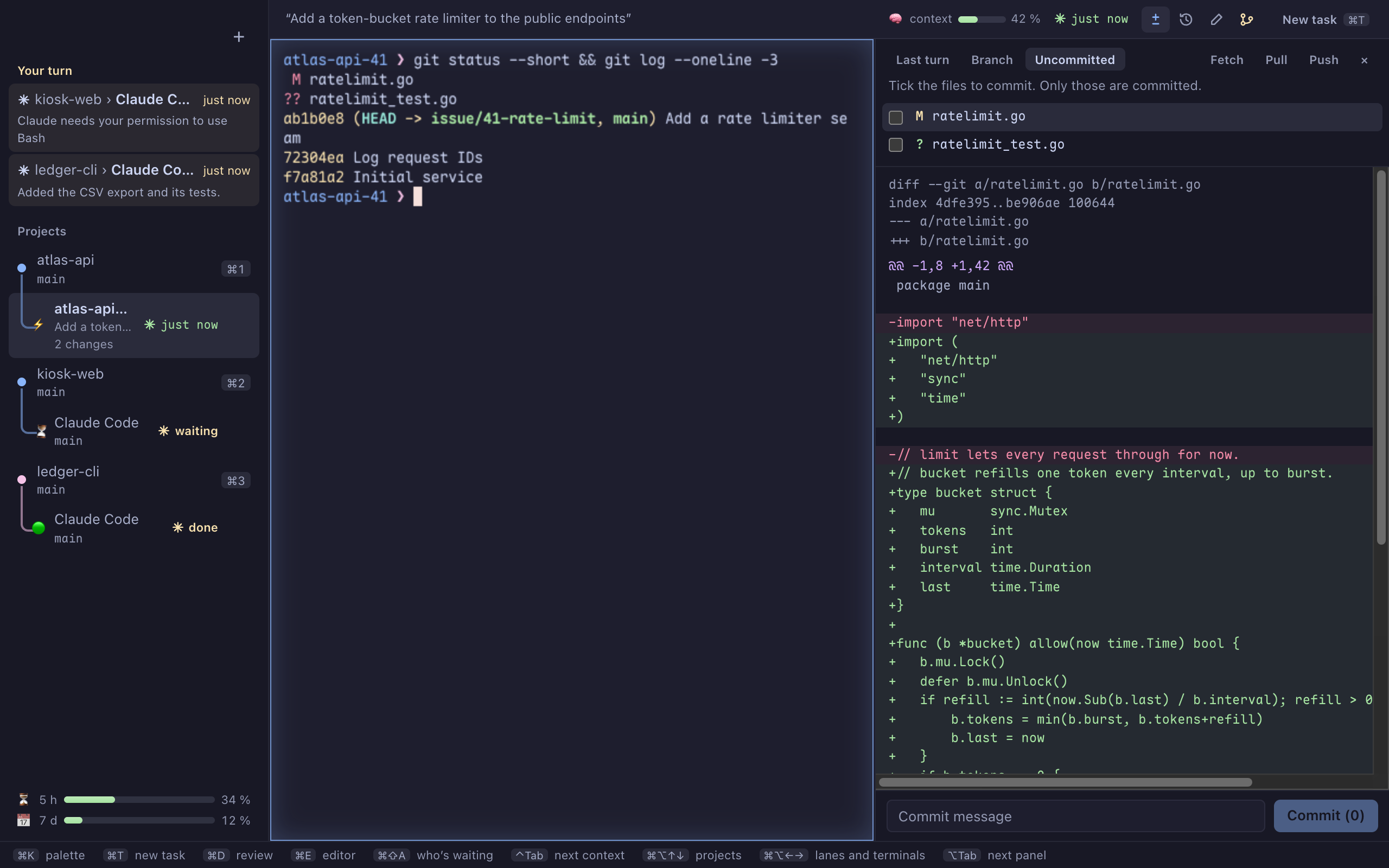
⌘D / Ctrl+Shift+D opens the review beside the terminal: what changed, file by file, with its diff. Tick the files you keep, write the message, commit, push — Push counts the commits about to leave.
Pull only fast-forwards and refuses a branch that has diverged. ⌘⇧H / Ctrl+Shift+H opens the history and the branches, the project’s lanes drawn in the graph.
From an issue to a merge
Lineside reads your forge through glab or gh — GitLab or GitHub, hosted or self-hosted.
- ⌘Y / Ctrl+Shift+Y writes an issue: a title, a Markdown body with live preview, labels, pasted screenshots. Claude can draft it for you.
- ⌘G / Ctrl+Shift+G lists the open issues and merge requests. ⌘↩ / Ctrl+Enter on an issue hands it to an agent, on its own lane
issue/12-…. - The merge request leaves from the lane’s branch with
Closes #12. Opening it, like closing an issue, is confirmed first, and the confirmation names what leaves.
Keyboard first
Everything has a key, and nothing asks you to remember it.
Hold ⌘ (Ctrl+Shift on Windows) and the shortcuts of the moment appear, grouped, like which-key in Neovim. A bar at the bottom of the window keeps those of what you are doing.
⌘K / Ctrl+Shift+K finds any project, command, lane or file; ⌥Tab / F6 moves the keyboard to the next panel.
Designed on an AZERTY keyboard: no shortcut sits on a shifted digit or symbol, and ⌘1…⌘9 read the key where it is — ⌘& is enough.
It orchestrates, it doesn’t reimplement
Your tools, as they are
git, glab, gh and claude are run, not replaced. What you know of them still holds.
Nothing out of sight
Everything that runs does so in a terminal you can see on the rail.
Nothing behind your back
Pushing and merging are explicit, confirmed gestures: nothing leaves on its own. Nothing runs in a repository you have not adopted.
Where it stands
Lineside runs on macOS (Apple silicon) and Windows (x64). It is not distributed yet: no signed build, no update channel outside its sources. What that means, and how to run it anyway.